AmmaPickles-Ecommerce
Spring Boot E-commerce Backend Project (AmmaPickles)







A full-stack e-commerce platform for authentic Andhra homemade pickles — built with Spring Boot, Thymeleaf web frontend, and a complete JWT-secured REST API backend. Containerized with Docker and deployed on Render.
🌐 Live Demo
👉 https://ammapickles-ecommerce.onrender.com
Note: Hosted on Render free tier — app may take 30–40 seconds to wake up on first visit.
📸 Screenshots
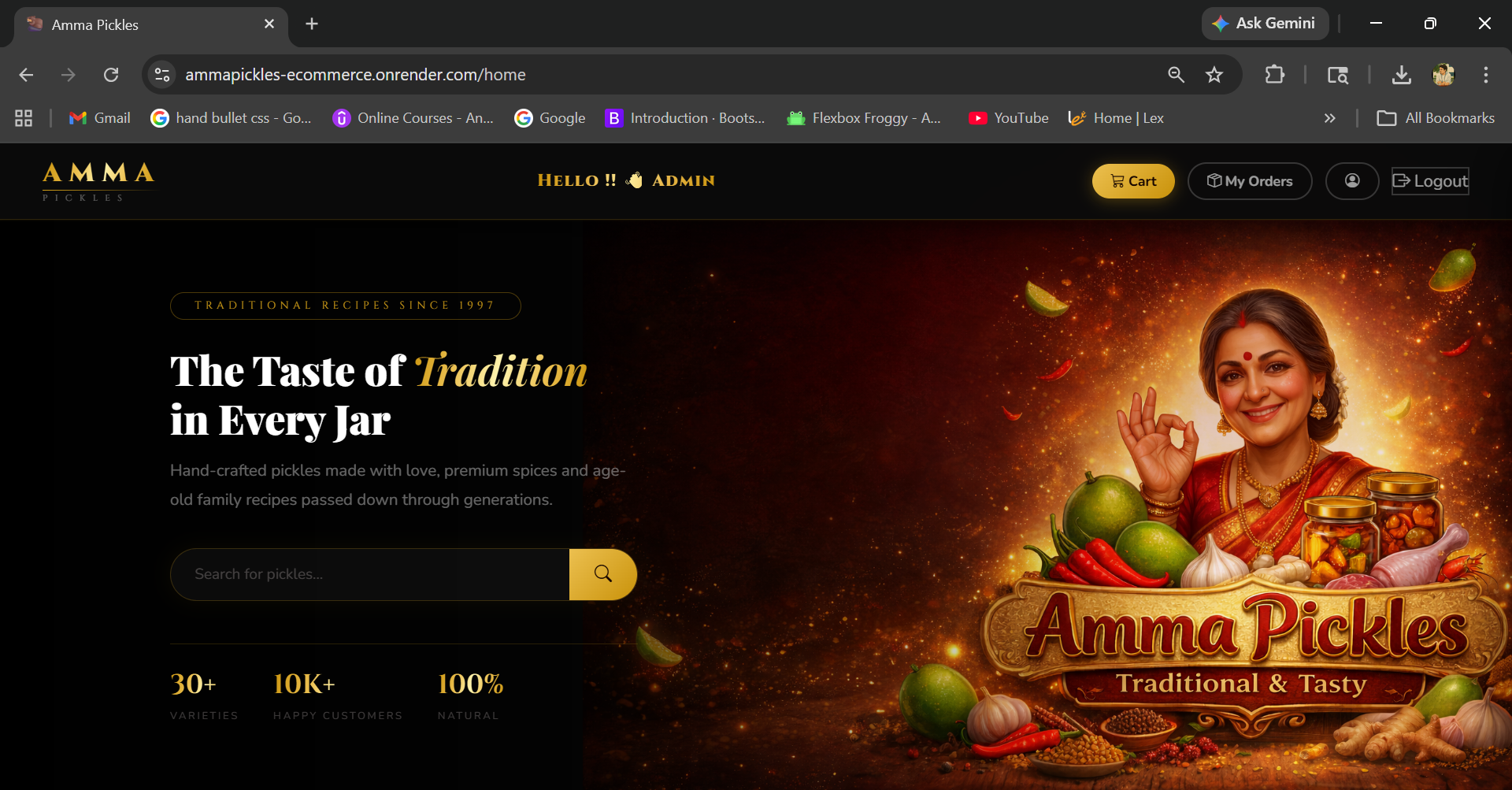
Home Page
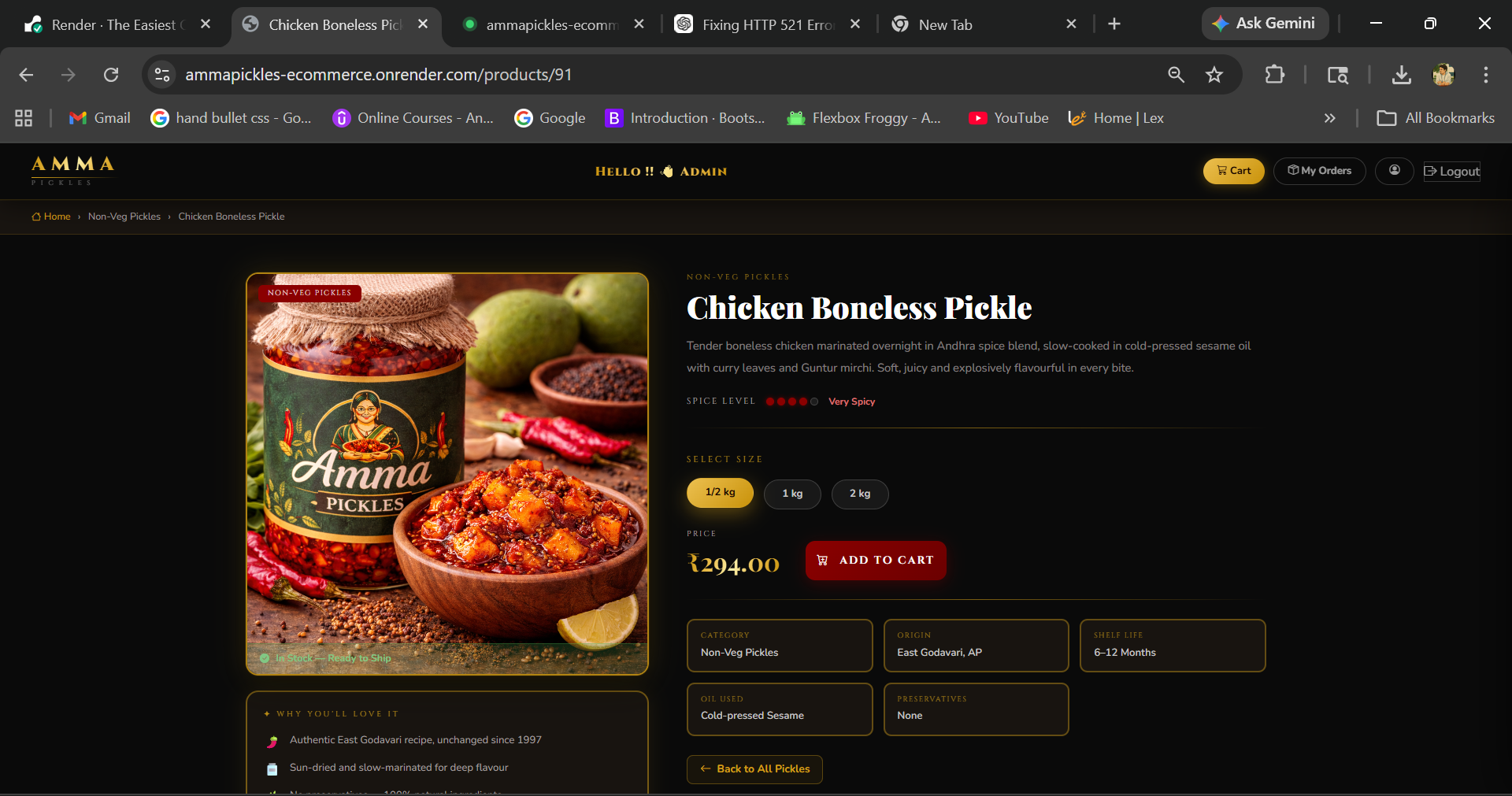
Product Detail
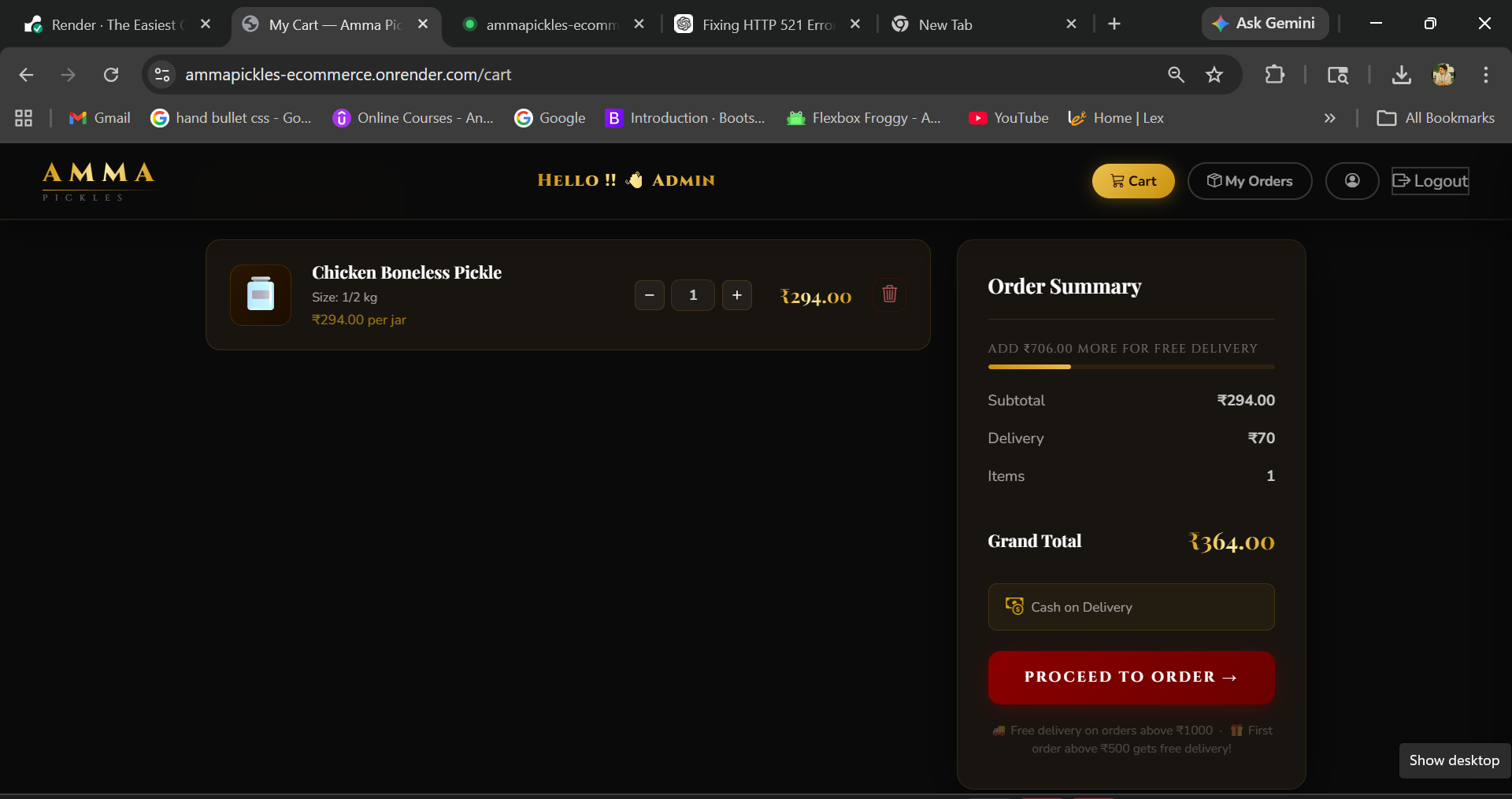
Cart
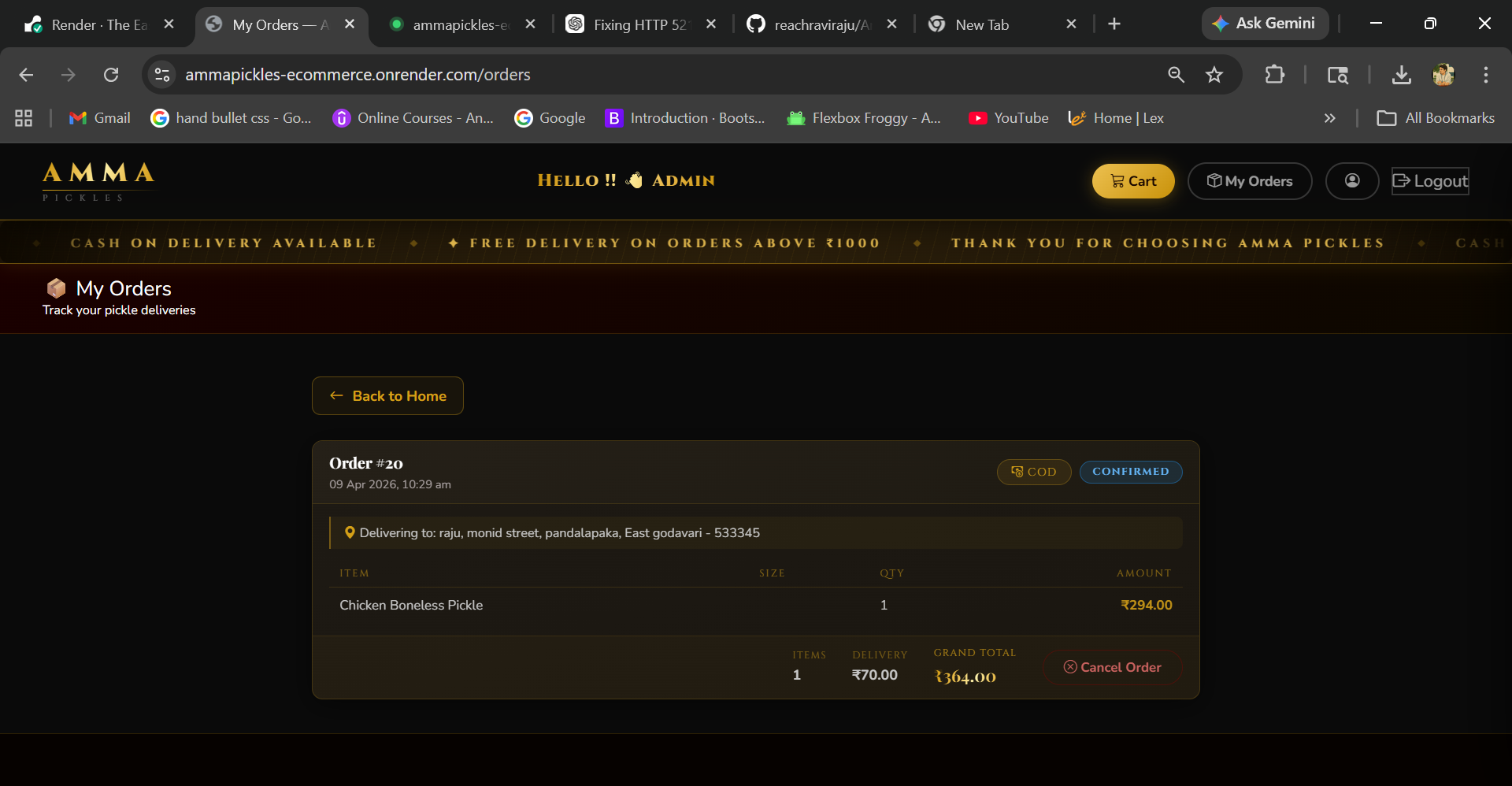
Orders
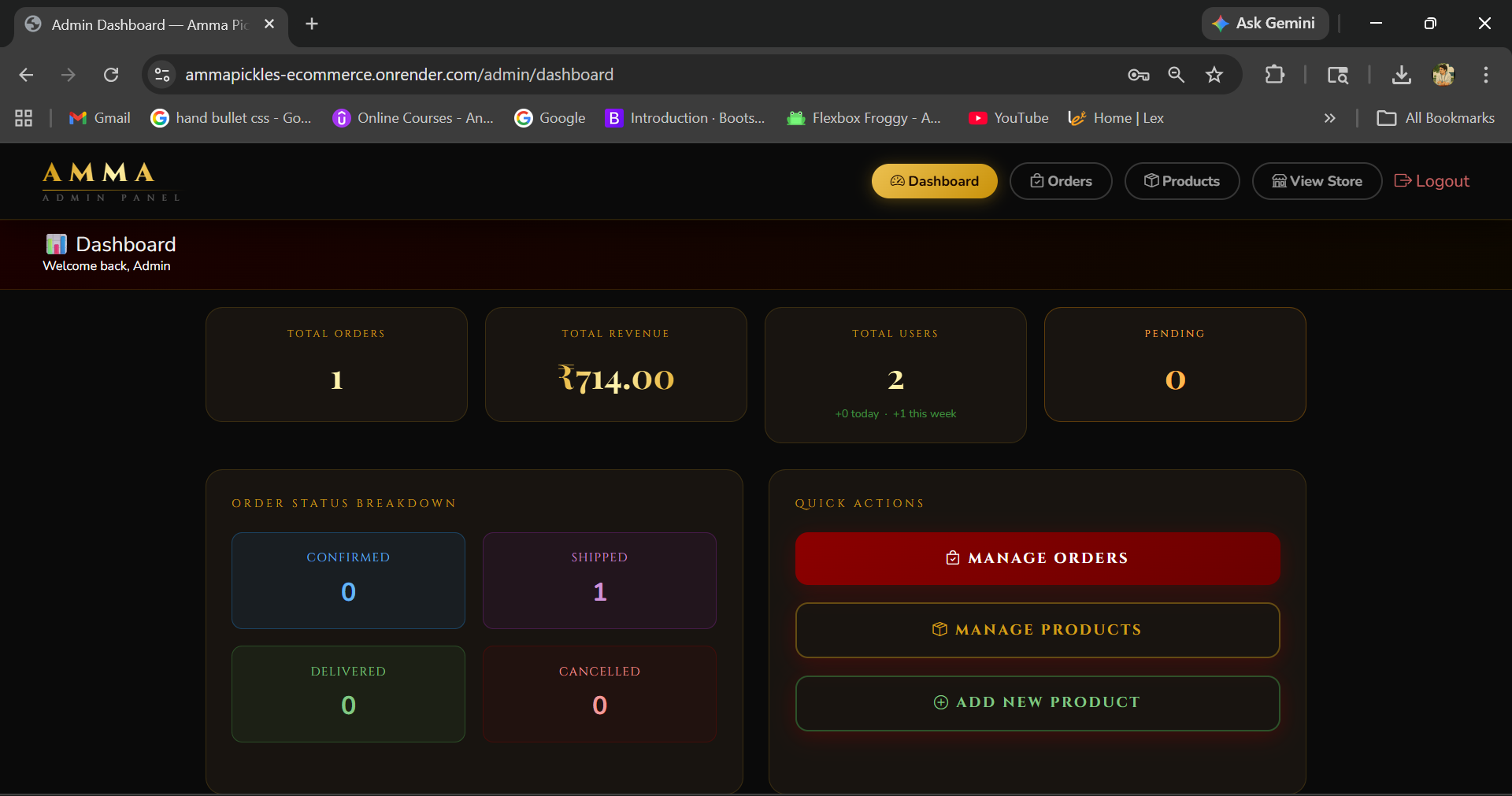
Admin Dashboard
📌 About the Project
Amma Pickles is a fully functional online store for ordering traditional Andhra pickles — Veg and Non-Veg varieties available in three sizes (½ kg, 1 kg, 2 kg). The project features a dual architecture: a Thymeleaf-rendered web UI for customers, and a JWT-secured REST API for external/mobile access.
What’s working:
- Browse and search products by name or category
- Product detail page with size variants
- Cart management (add, update, remove, clear)
- Place orders with COD — confirmed immediately
- Flat ₹70 delivery charge (free above ₹1000 or first order above ₹500)
- Stock is deducted on order and restored on cancellation
- Delivery address management
- Session-based web login and JWT-based API login
- Login with email or phone number
- OTP email verification on registration
- Secure forgot-password flow with email token
- Email notifications on registration and order events
- Admin dashboard — manage products, categories, users, and orders
- Real-time registration form validation with debounced API checks
🏗️ Architecture
This project uses a dual-layer architecture — both layers share the same service and repository code:
| Layer | Technology | Auth Method |
|---|---|---|
| Web Frontend | Thymeleaf + HTML/CSS | Session-based (Spring Security form login) |
| REST API | JSON responses | JWT Bearer Token (stateless) |
🛠️ Tech Stack
| Category | Technology |
|---|---|
| Language | Java 17 |
| Framework | Spring Boot 3.5.6 |
| ORM | Spring Data JPA / Hibernate |
| Database | MySQL 8.0 |
| Security | Spring Security (JWT + Session) |
| Frontend | Thymeleaf, HTML, CSS |
| Brevo SMTP | |
| Caching | Spring Cache |
| Build Tool | Maven |
| Containerization | Docker (multi-stage build) |
| Validation | Jakarta Bean Validation |
| Monitoring | Spring Boot Actuator |
| Utilities | Lombok, SLF4J |
⚡ Performance Optimizations
| Optimization | Description |
|---|---|
| Spring Cache | Products cached in memory — reduces DB hits on every request |
| Cache Eviction | Cache auto-clears on admin add/update/delete — always fresh data |
| Lazy Initialization | Beans load on demand — reduces startup time by ~40% |
| Database Indexing | Indexes on name, category_id, composite — faster queries |
| Connection Pooling | HikariCP limited to 5 connections — protects free tier DB |
| open-in-view disabled | Prevents unnecessary DB connections during view rendering |
🚀 Deployment
| Component | Platform |
|---|---|
| Application | Render (Docker container) |
| Database | Aiven MySQL |
| Containerization | Docker (multi-stage build) |
| Email Service | Brevo SMTP |
Docker multi-stage build — Stage 1 builds the jar using Maven, Stage 2 runs only the jar using lightweight JRE. Final image is small and production-ready.
📁 Project Structure
src/main/
├── java/com/ammapickles/backend/
│   ├── AmmaPicklesApplication.java
│   ├── config/
│   │   └── AppConfig.java
│   ├── controller/
│   │   ├── AuthController.java          ← REST: /api/auth/**
│   │   ├── AuthViewController.java      ← Web: /login, /register
│   │   ├── ProductController.java       ← REST: /api/products/**
│   │   ├── ProductViewController.java   ← Web: /products/{id}
│   │   ├── HomeViewController.java      ← Web: /home
│   │   ├── CartController.java          ← REST: /api/cart/**
│   │   ├── CartViewController.java      ← Web: /cart
│   │   ├── OrderController.java         ← REST: /api/orders/**
│   │   ├── OrderViewController.java     ← Web: /orders
│   │   ├── CategoryController.java      ← REST: /api/categories/**
│   │   ├── AddressController.java       ← REST: /api/addresses/**
│   │   ├── AddressViewController.java   ← Web: /addresses/**
│   │   └── UserController.java          ← REST: /api/users/**
│   ├── dto/
│   ├── entity/
│   ├── exception/
│   ├── repository/
│   ├── security/
│   └── service/
│
└── resources/
    ├── application.properties
    ├── application.properties.example
    ├── static/
    │   ├── css/style.css
    │   └── images/default-product.png
    └── templates/
        ├── home.html
        ├── login.html
        ├── register.html
        ├── cart.html
        ├── orders.html
        ├── place-order.html
        ├── product-detail.html
        ├── add-address.html
        └── fragments/
            ├── navbar.html
            └── footer.html
⚙️ Setup & Configuration
Prerequisites
- Java 17+
- MySQL 8.0+
- Maven 3.6+
- Docker (optional — for containerized run)
1. Clone the Repository
git clone https://github.com/reachraviraju/AmmaPickles-Ecommerce.git
cd AmmaPickles-Ecommerce
2. Create the Database
CREATE DATABASE amma_pickles;
3. Insert Required Roles
USE amma_pickles;
INSERT INTO roles (name) VALUES ('ROLE_CUSTOMER');
INSERT INTO roles (name) VALUES ('ROLE_ADMIN');
4. Configure application.properties
cp src/main/resources/application.properties.example src/main/resources/application.properties
spring.application.name=AmmaPickles
server.port=8080

# MySQL
spring.datasource.url=jdbc:mysql://localhost:3306/amma_pickles
spring.datasource.username=your_db_username
spring.datasource.password=your_db_password
spring.datasource.driver-class-name=com.mysql.cj.jdbc.Driver

# JPA
spring.jpa.hibernate.ddl-auto=update
spring.jpa.show-sql=false
spring.jpa.open-in-view=false

# JWT (24 hours expiry)
jwt.secret=your_base64_encoded_secret_key
jwt.expiration=86400000

# Mail (Brevo SMTP)
spring.mail.host=smtp-relay.brevo.com
spring.mail.port=587
spring.mail.username=your_brevo_email
spring.mail.password=your_brevo_smtp_key
app.mail.from=your_sender_email

# Cache
spring.cache.type=simple

# Lazy initialization
spring.main.lazy-initialization=true

# Actuator
management.endpoints.web.exposure.include=health,info
5. Run the Application
mvn spring-boot:run
Visit: http://localhost:8080/home
6. Run with Docker
docker build -t ammapickles .
docker run -p 8080:8080 ammapickles
🔐 Security Configuration
Web Chain (Session-based)
| Route | Access |
|---|---|
/, /home, /products/** |
Public |
/login, /register |
Public |
/css/**, /images/**, /favicon.ico |
Public |
/cart/**, /orders/**, /addresses/** |
Authenticated (session) |
- Login:
POST /loginwith fieldsusername(email or phone) andpassword - Logout:
GET /logout→ redirects to/home
API Chain (JWT — Stateless)
| Route | Access |
|---|---|
/api/auth/** |
Public |
GET /api/products/**, GET /api/categories/** |
Public |
/actuator/health |
Public |
/api/cart/**, /api/orders/**, /api/addresses/** |
ROLE_CUSTOMER |
POST/PUT/DELETE /api/products/** |
ROLE_ADMIN |
POST/PUT/DELETE /api/categories/** |
ROLE_ADMIN |
/api/orders/admin/** |
ROLE_ADMIN |
/actuator/** |
ROLE_ADMIN |
/api/users/** |
Authenticated |
Token format: Authorization: Bearer <jwt_token>
Token expiry: 24 hours
Password encoding: BCrypt (strength 12)
🌐 Web Pages (Thymeleaf)
| URL | Page | Auth |
|---|---|---|
/home |
Product catalog — browse, search, filter by category | No |
/products/{id} |
Product detail with size variants | No |
/login |
Login form (email or phone) | No |
/register |
Registration form with live validation | No |
/forgot-password |
Request password reset via email | No |
/cart |
Shopping cart | Yes |
/orders |
Order history | Yes |
/orders/place |
Place order — choose delivery address | Yes |
/addresses/add |
Add new delivery address | Yes |
/admin/dashboard |
Admin dashboard — users, products, orders | ADMIN |
📦 Product Structure
Each pickle product has 3 size variants:
| Size | Label | Weight |
|---|---|---|
SMALL |
½ kg | 500g |
MEDIUM |
1 kg | 1000g |
LARGE |
2 kg | 2000g |
Products are displayed grouped by name on the home and detail pages.
🚚 Delivery Charge Logic
| Condition | Charge |
|---|---|
| Order total ≥ ₹1000 | FREE |
| First order ≥ ₹500 | FREE |
| All other orders | ₹70 flat |
deliveryCharge = ₹0    [if orderTotal ≥ ₹1000 OR first order ≥ ₹500]
deliveryCharge = ₹70   [all other orders]
grandTotal     = totalAmount + deliveryCharge
📋 REST API Endpoints
Authentication — /api/auth
| Method | Endpoint | Auth | Description |
|---|---|---|---|
| POST | /api/auth/register |
Public | Register new customer |
| POST | /api/auth/login |
Public | Login with email or phone, returns JWT |
| POST | /api/auth/forgot-password |
Public | Send password reset OTP to email |
| POST | /api/auth/reset-password |
Public | Reset password using OTP token |
| GET | /api/auth/verify/{token} |
Public | Email verification on registration |
Register Request:
{
  "username": "Ravi Raju",
  "email": "ravi@example.com",
  "password": "yourpassword",
  "phoneNumber": "9876543210"
}
Password must be at least 8 characters and contain at least one number and one special character.
Login Request:
{
  "email": "ravi@example.com",
  "password": "yourpassword"
}
Can also login with phone number instead of email.
Login Response:
{
  "success": true,
  "message": "Login successful",
  "data": {
    "token": "eyJhbGciOiJIUzI1NiJ9...",
    "email": "ravi@example.com",
    "username": "Ravi Raju",
    "role": "ROLE_CUSTOMER"
  }
}
Users — /api/users
| Method | Endpoint | Auth | Description |
|---|---|---|---|
| GET | /api/users/{id} |
Authenticated | Get user by ID |
| GET | /api/users/email/{email} |
Authenticated | Get user by email |
| PUT | /api/users/{id} |
Authenticated | Update user details |
| DELETE | /api/users/{id} |
Authenticated | Delete user account |
Categories — /api/categories
| Method | Endpoint | Auth | Description |
|---|---|---|---|
| GET | /api/categories |
Public | Get all categories |
| GET | /api/categories/{id} |
Public | Get category by ID |
| POST | /api/categories |
ADMIN | Add new category |
| PUT | /api/categories/{id} |
ADMIN | Update category |
| DELETE | /api/categories/{id} |
ADMIN | Delete category |
Products — /api/products
| Method | Endpoint | Auth | Description |
|---|---|---|---|
| GET | /api/products?page=0&size=10&sort=price,asc |
Public | All products (paginated) |
| GET | /api/products/{id} |
Public | Single product |
| GET | /api/products/category/{categoryId} |
Public | By category (paginated) |
| GET | /api/products/search?name=mango |
Public | Search by name |
| GET | /api/products/grouped |
Public | All products grouped by name with size variants |
| GET | /api/products/grouped/category/{categoryId} |
Public | Grouped by category |
| GET | /api/products/grouped/search?keyword=chicken |
Public | Grouped search |
| POST | /api/products |
ADMIN | Add product |
| PUT | /api/products/{id} |
ADMIN | Update product |
| DELETE | /api/products/{id} |
ADMIN | Delete product |
Grouped Product Response:
{
  "name": "Mango",
  "description": "Traditional Andhra Avakaya",
  "categoryName": "Veg Pickles",
  "categoryId": 1,
  "variants": [
    { "id": 1, "size": "SMALL", "sizeLabel": "½ kg", "price": 149.00, "inStock": true, "quantity": 20 },
    { "id": 2, "size": "MEDIUM", "sizeLabel": "1 kg", "price": 249.00, "inStock": true, "quantity": 15 },
    { "id": 3, "size": "LARGE", "sizeLabel": "2 kg", "price": 449.00, "inStock": false, "quantity": 0 }
  ]
}
Cart — /api/cart
| Method | Endpoint | Auth | Description |
|---|---|---|---|
| GET | /api/cart/user/{userId} |
CUSTOMER | Get cart with items and total |
| POST | /api/cart/user/{userId}/product/{productId}?quantity=2 |
CUSTOMER | Add item |
| PUT | /api/cart/item/{cartItemId}?quantity=3 |
CUSTOMER | Update quantity |
| DELETE | /api/cart/item/{cartItemId} |
CUSTOMER | Remove item |
| DELETE | /api/cart/user/{userId}/clear |
CUSTOMER | Clear cart |
Adding an existing product to the cart merges the quantity rather than duplicating it. Adding out-of-stock products is blocked with a clear error message.
Orders — /api/orders
Customer Endpoints
| Method | Endpoint | Auth | Description |
|---|---|---|---|
| GET | /api/orders/user/{userId} |
CUSTOMER | Get my orders |
| GET | /api/orders/{id} |
CUSTOMER | Get order (JWT-verified ownership) |
| POST | /api/orders |
CUSTOMER | Place COD order |
| DELETE | /api/orders/{id} |
CUSTOMER | Cancel order |
Place Order Request:
{
  "addressId": 1
}
userIdis read from the JWT token — not the request body. This prevents placing orders under another user’s ID.
Order Response:
{
  "id": 12,
  "status": "CONFIRMED",
  "totalAmount": 398.00,
  "deliveryCharge": 70.00,
  "grandTotal": 468.00,
  "orderDate": "2025-01-15T10:30:00",
  "deliveryAddress": "12 Main St, Kurnool, Kurnool - 518001",
  "items": [
    {
      "productId": 5,
      "productName": "Ginger Pickle",
      "quantity": 2,
      "sizeLabel": "1 kg",
      "priceAtTimeOfOrder": 199.00,
      "itemTotal": 398.00
    }
  ]
}
Cancellation rule: Only CONFIRMED orders can be cancelled. Stock is automatically restored.
Admin Endpoints
| Method | Endpoint | Auth | Description |
|---|---|---|---|
| GET | /api/orders/admin/all?page=0&size=10 |
ADMIN | All orders (paginated) |
| GET | /api/orders/admin/{id} |
ADMIN | Any order by ID |
| PUT | /api/orders/admin/{id}/status?status=SHIPPED |
ADMIN | Update status |
Order statuses: PENDING → CONFIRMED → SHIPPED → DELIVERED / CANCELLED
Addresses — /api/addresses
| Method | Endpoint | Auth | Description |
|---|---|---|---|
| GET | /api/addresses/user/{userId} |
CUSTOMER | Get all addresses |
| GET | /api/addresses/{id} |
CUSTOMER | Get address by ID |
| POST | /api/addresses/user/{userId} |
CUSTOMER | Add address |
| PUT | /api/addresses/{id} |
CUSTOMER | Update address |
| DELETE | /api/addresses/{userId}/{id} |
CUSTOMER | Delete address |
Address Request:
{
  "name": "Home",
  "street": "12 Market Road",
  "city": "Kurnool",
  "district": "Kurnool",
  "state": "Andhra Pradesh",
  "pincode": "518001"
}
pincodemust be exactly 6 digits, cannot start with 0.
Actuator
| Endpoint | Access |
|---|---|
/actuator/health |
Public |
/actuator/info |
Public |
/actuator/** |
ADMIN only |
🗄️ Database Tables
| Table | Description |
|---|---|
users |
Customer and admin accounts |
roles |
ROLE_CUSTOMER, ROLE_ADMIN |
user_roles |
Many-to-many join |
categories |
Veg / Non-Veg |
products |
All variants (name + size + stock) |
carts |
One cart per user |
cart_items |
Items with quantity |
orders |
Orders with total, delivery charge, status |
order_items |
Line items with price snapshot at order time |
addresses |
Delivery addresses |
password_reset_tokens |
Secure tokens for forgot-password flow |
email_verification_tokens |
Tokens for email verification on registration |
⚠️ Error Handling
All REST errors return a consistent format:
{
  "success": false,
  "message": "Product not found with id: 99",
  "data": null
}
| Scenario | HTTP Status |
|---|---|
| Resource not found | 404 |
| Duplicate email on register | 400 |
| Empty cart on order | 400 |
| Out of stock on add to cart | 400 |
| Cancelling non-CONFIRMED order | 400 |
| Insufficient stock | 400 |
| Validation errors | 400 |
| Not authenticated | 401 |
| Wrong role | 403 |
🧪 Testing the API (Postman)
Step 1 — Register
POST https://ammapickles-ecommerce.onrender.com/api/auth/register
Content-Type: application/json

{
  "username": "Test User",
  "email": "test@example.com",
  "password": "test@1234",
  "phoneNumber": "9876543210"
}
Step 2 — Login & Copy Token
POST https://ammapickles-ecommerce.onrender.com/api/auth/login
Content-Type: application/json

{
  "email": "test@example.com",
  "password": "test@1234"
}
Step 3 — Set Bearer Token in Postman
Authorization tab → Bearer Token → paste the token.
Step 4 — Browse Products
GET https://ammapickles-ecommerce.onrender.com/api/products/grouped
Step 5 — Add to Cart
POST https://ammapickles-ecommerce.onrender.com/api/cart/user/1/product/5?quantity=2
Authorization: Bearer <token>
Step 6 — Add Address
POST https://ammapickles-ecommerce.onrender.com/api/addresses/user/1
Authorization: Bearer <token>
Content-Type: application/json

{
  "name": "Home",
  "street": "12 Main Road",
  "city": "Kurnool",
  "district": "Kurnool",
  "state": "Andhra Pradesh",
  "pincode": "518001"
}
Step 7 — Place Order
POST https://ammapickles-ecommerce.onrender.com/api/orders
Authorization: Bearer <token>
Content-Type: application/json

{
  "addressId": 1
}
🔜 Planned Features
| Feature | Description | Status |
|---|---|---|
| Product Image Support | Add imageUrl field to products so each pickle displays its own photo | 📋 Planned |
| Razorpay Payment | Online payment integration | 📋 Planned |
| Order Detail Page (Web) | Individual order detail page showing full breakdown | 📋 Planned |
| Interactive Orders Page | Expandable timeline panel with order status tracking | 📋 Planned |
👨💻 Developer
Ravi Raju Chintalapudi Java Backend Developer 🔗 GitHub: @reachraviraju
Built with ❤️ and spice — straight from Andhra.